You can cancel your vouchers online by going into your Busy Bees account, you can also schedule these changes for the future so do not have to wait until it is the upcoming payroll to make your deduction.
To start, log into the busy bees portal via our SSO link.
Once on the Busy Bee page, click on "Salary Deduction Request" on the left hand menu.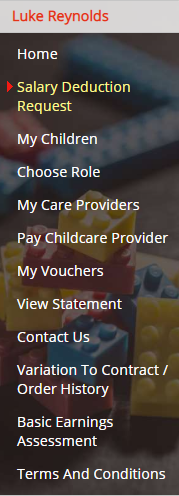
You will then be greeted by an area where you may cancel your vouchers, or instead schedule a payment holiday.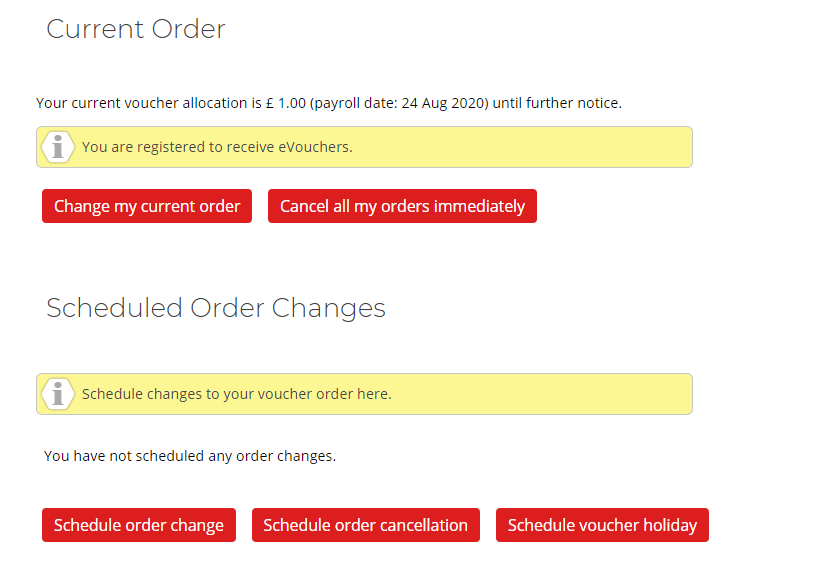
Please note: Childcare vouchers can be used for any ofsted registered before/after school activity, or summer camps AND are valid for children up to 15. Often parents use their vouchers for dance clubs, sports clubs amongst a whole bunch of other activities...So just because your young child has started school, doesn't mean you necessarily will have no use for childcare vouchers.
Also note: If you leave the childcare voucher scheme for more than 52 weeks you will no longer be able to signup again, as the government has stopped new entrants to the scheme...because of this, many parents opt to lower their value to the minimum, £1, per pay period in order to remain in the scheme in the long term.
Comments
0 comments
Article is closed for comments.