The Data mapper enables you to download an extract from payroll in almost any format, then map it to our payslip software. This whole process takes between 5 and 20 minutes at setup phase.
Once done, you can then reuse the existing mapping each map period.

How to map?
The column headers on the left hand side are from your file. Drag and drop corresponding fields onto their system, equivalent on the right hand side. (e.g. Last name = Surname / DOB = DateOfBirth) Highlighted columns are mandatory.
The data mapper maps using number e.g. 1-1 & 3-3. If you are adding a new column after you have already mapped your file data, please be sure to add it to the end of the file rather than in between any of the previously mapped data.
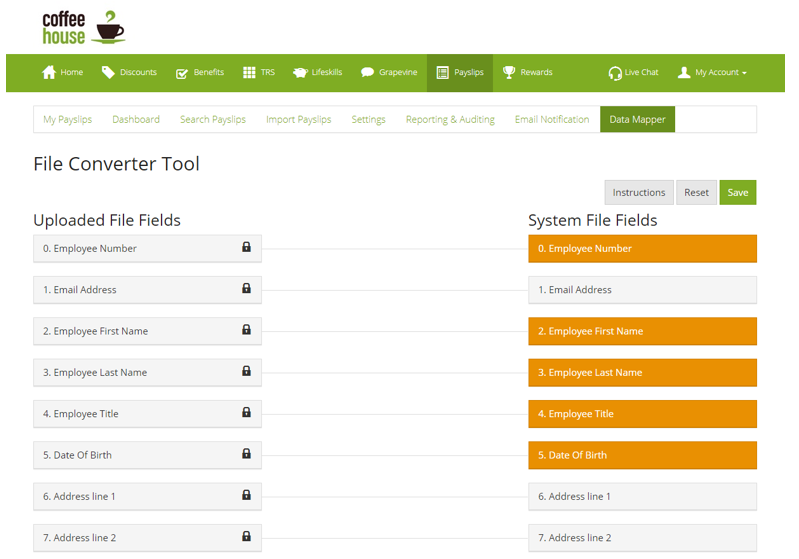
Once you have completed your mapping you can submit your first file.
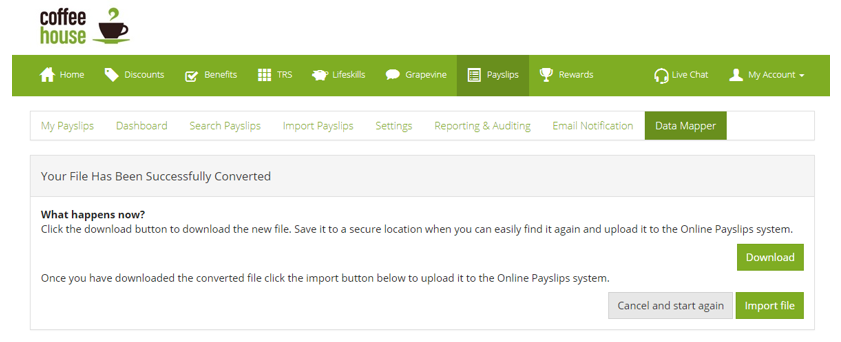
Download your transformed file, and head over to import for the first time!
Comments
0 comments
Article is closed for comments.