Setting up Single Sign-on to YouatWork from Azure AD (also known as Office 365) is rather simple and straightforward. It is the most common form of Single Sign-on amongst our customer base, and can be up and running within a day.
IDP or SP Initiation?
This is one for the tech team to read, but our most common amongst Azure AD Single-Sign-on customers is SP initiation.
Authentication options
The Single Sign-on Request can authenticate off of either a Unique ID or Email Address.
Most customers use the payroll ID as the Unique ID for employee on the YouatWork system, however, customers often do not sync payroll ID into their Azure system; which means Email Address is the most common means of authentication.
Important Note: If you use email address for authentification, then all employees must have an email address with Azure
What Journey do you want employees to follow to access the site?
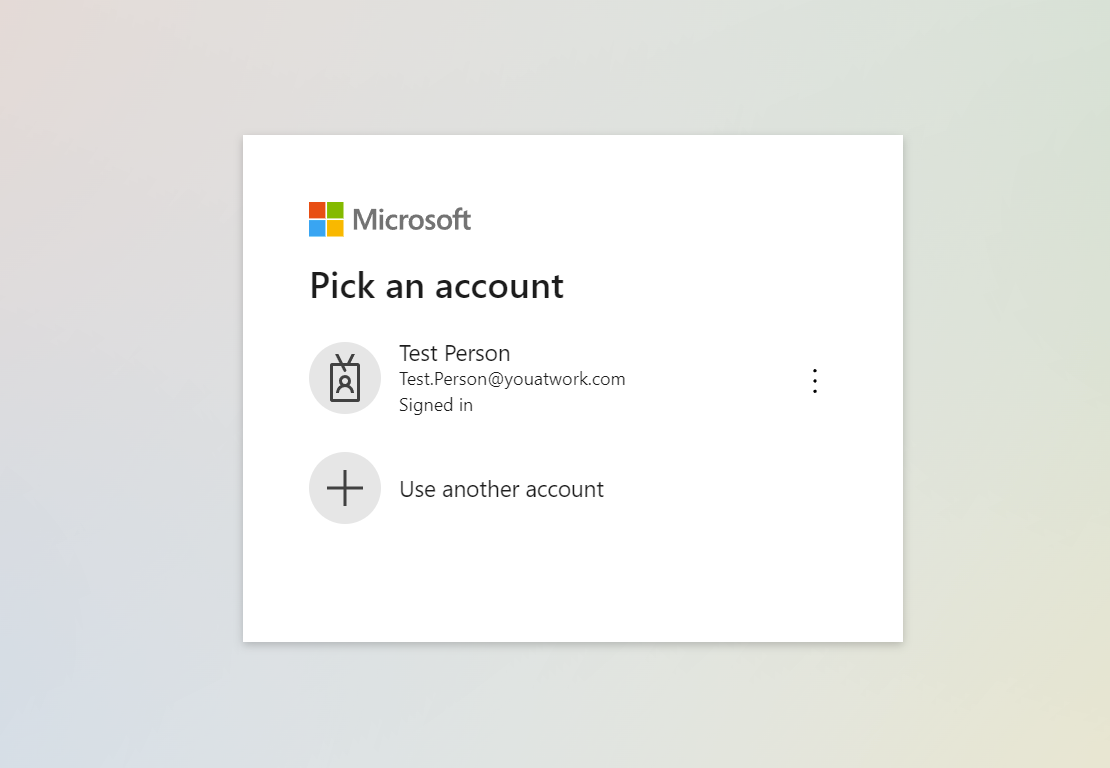
Once the Single-Sign-on is enabled, employees who access the web address for your YouatWork site (commonly https://companyname.youatwork.com) will be automatically logged in if their Azure session is already active (that means if they've logged in to their emails that day or other Office 365 applications). Those who haven't got an active Azure session will instead be presented by a Microsoft login page, as shown in the screenshot below. Where they can select their Azure account and access the site.
When implementing Single Sign-on, customers often want to change the journey employees use to access the site. Often they want to make their HR system the main focal point and will add a link to their HR site to the YouatWork. This is absolutely fine and we encourage you to do so as, but it is not essential as you could continue to use the current journey, of simply directing employees to our site directly.
Limitations:
Access:
A purposeful security constraint has been setup to ensure that once Single-Sign-on is enabled, the YouatWork site can only be accessed via by that method. This will mean all employees must have an Azure AD account in order to access the YouatWork system once the Single Sign-on is live.
Data that can be sent:
Our Single Sign-on technology allows customers to send employee data each time the employee accesses the site; this can be used to update employee records with their most recent data. However, we are informed by customers that the options within Azure do not allow for this. Clients who require more personal data on their users, for example Date of Birth to calculate the cost of Private Medical Insurance, can still use our self-service tools to provide this data.
Creation of employees:
Our Single-Sign-on technology has the ability to create users who do not already exist on the YouatWork system but pass authentication from the customer's system. However, our understanding is this is not possible with Azure Single-Sign-on, and therefore employees will need to exist on the YouatWork system for them to be granted access.
Clients who use Azure Single Sign-On still process weekly/monthly data imports for new joiners and leavers, using the self-service tools. However, you could look into using the YouatWork Users API to send us new joiner data automatically to save on the manual administration.
What do we need to set this up?
First, speak with your account manager to register your interest as implementation on our side is usually chargeable.
Once agreed, we will provide your IT team with a set of data and request a set of data back from you for your IT team.
Existing customers will need their site put into maintenance mode whilst testing is done. We will agree a date with you in advance.
Data we will provide your IT team to start their config:
- Our Entity ID:
- Our X509 Certificate
- Our AssertionConsumerService (ACS) URL
Data we will need back from your IT team to start our config:
- Your Entity ID
- Your Login URL
- Your X509 Certificate (in .txt format preferrably)
Comments
0 comments
Please sign in to leave a comment.