We've recently introduced a 'Generic Provider' report in your reporting dashboard within the 'Benefit Selections' section.
Once your benefit selection window has come to a close and you're happy with your payroll report, you are now able to download individual benefit reports to pass to your respective broker and/or providers.
In order to find the reporting interface, please follow the below journey:
Admin Suite > Benefits > Benefit Selections > Reporting

Please click into the drop-down section as below and select 'Generic Provider Report'
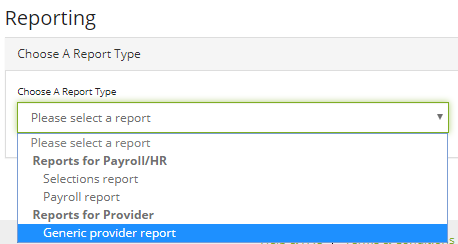
Once selected, the page will update with new options to complete before being able to pull-off the respective report:
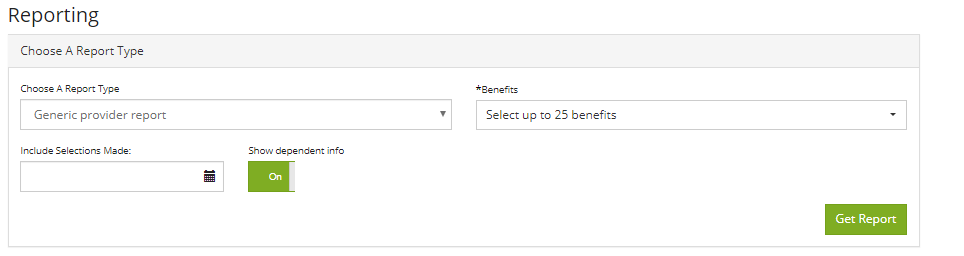
You will have 3 options to consider:
1.) Benefits:
Click the drop-down option and scroll down the list to select the benefit you wish to pull a report for. You can select multiple at once.
2.) Dates:
You have the option to download selections made during a date range of your choosing. This will be useful if you have multiple windows with the same benefit.
3.) Dependent Information:
Click the toggle to include or exclude extra columns containing dependent information added by employees during their benefit selection. Turn this off for benefits that do not provide the option of partners or children.
Once you have made your choices, you will see a screen similar to the below:
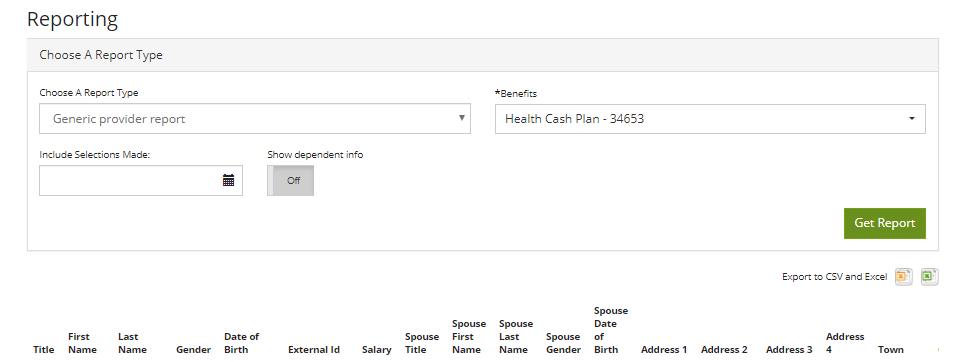
The report will appear ready for download. Please click one of the two Excel icons in order to download the report and then check-over before passing over to your respective broker or provider.
Comments
0 comments
Please sign in to leave a comment.