From the Admin Suite, navigate to the "Benefit Selections" area of the site.
The Reporting tab on the Benefit Selections page allows admins to generate 2 types of report payroll:
- Selections Report - lists each selection as a row so employees with multiple selections will be on multiple rows
- Payroll Report - lists each employee as a row, and their benefit selections as the pay period values in columns
By selecting one of these report types, the appropriate filters will be loaded. Enter the details of the report you want to generate, press Get report and the report will be generated below.
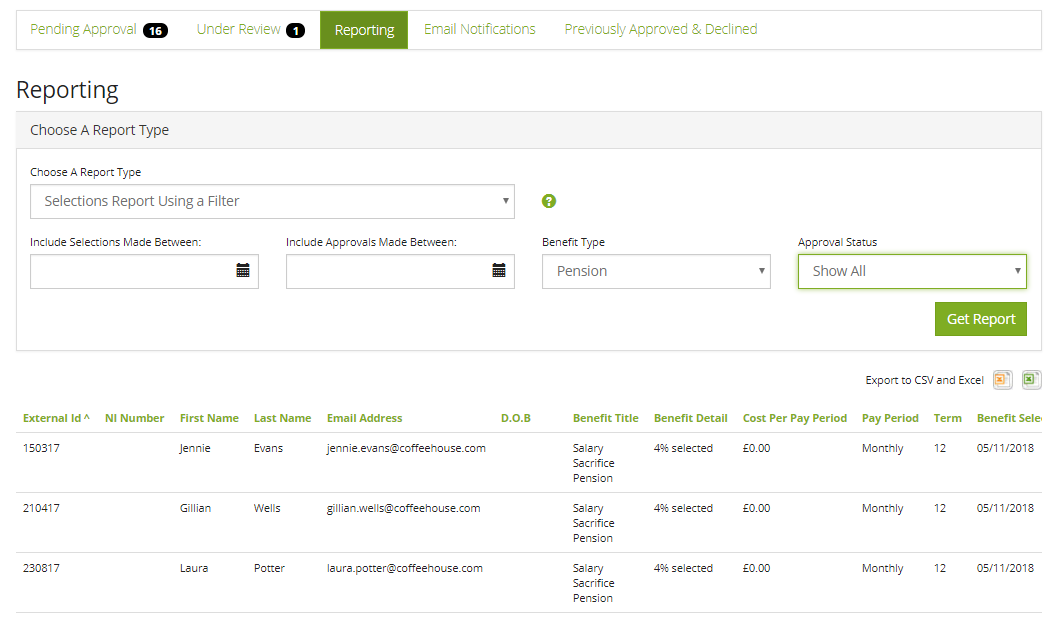
The report can be exported as a CSV or as an Excel book by selecting one of the icons at the top of the report (hover over the icon to determine which format is being exported)
You can run these reports on-demand, and their data is always accurate as per page load - so if you need to quickly add an extra selection, you can do so then return to the page for instantly updated reports.
Comments
0 comments
Article is closed for comments.