Important Notes:
- If the benefit is introduced by YouatWork ltd then please instead raise a request to our customer service team, as fulfillment is automated for these benefits, and you could reopen an order that has already been fulfilled, which could lead to duplication.
- If the benefit is one that you have introduced, and are manually running reports at the end of the selection window, then you can continue with the process outlined in this document
Start by heading to the Admin Suite > benefits > benefit manager.
Once you are in benefit manager go to the benefit where the selections need to be removed.
In the example we are changing the selection made to the Pension benefit. When you have found the benefit click to the selections. Click the number, which is highlighted below.

You are then taken to the page on which users have made selections for that specific benefit.
Find the user you want to remove the benefit selection from. Click the pencil icon from the action’s column as shown below.

When you have clicked the pencil icon you can choose where to put the benefit for the user, e.g added to basket, complete and remove. This is shown in the image below.
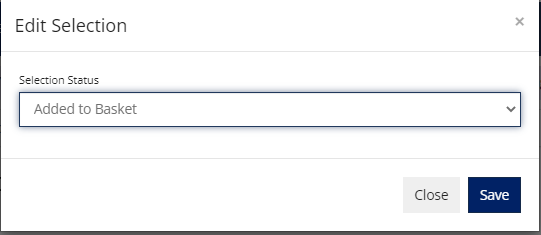
You have now changed the selection of the benefit for that user.
Comments
0 comments
Please sign in to leave a comment.