After receiving your feedback on Grapevine we've listened and made some much sought after amendments. We're excited to announce a few small changes that we believe will make a vast improvement for administrators of grapevine and potentially change how you can utilise grapevine within your company.
1.) Admins can now see a list of Event attendees
2.) Amendments to Mandatory Groups
3.) Search/Edit users page lists each user only once
4.) Assign Administrator rights via "admin suite"
We're eager to hear what you think about these changes; comment below to let us know what you think! Likewise, if you have ideas for new features or changes you'd like to see in the future then let us know and we'll consider them for potential future development.
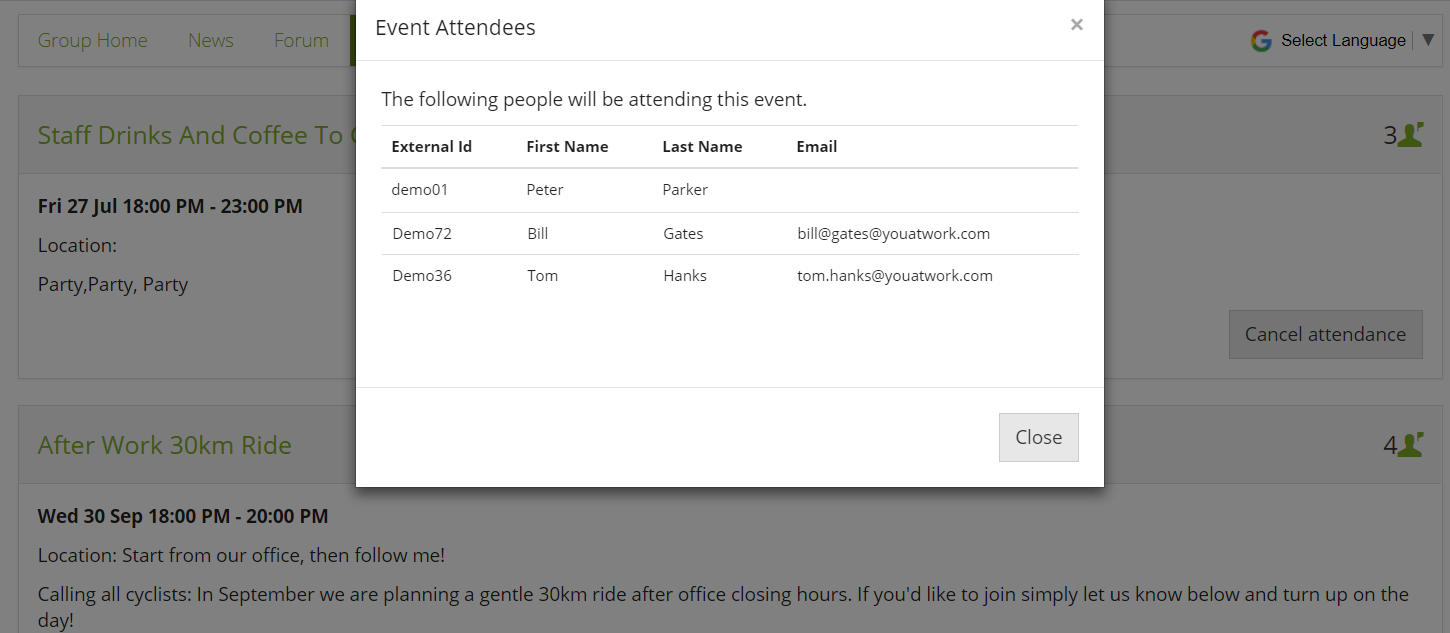
Admins can now see a list of Event attendees
We're very excited to tell you all about a much requested facility for an administrator to be able to view an attendee list!
Simply click the icon showing the number of attendees, and you'll see a list of staff who have confirmed.
This is limited to administrators only, users cannot see who else is attending.
Amendments to Mandatory Groups:
Probably the biggest change in this update is that now when you mark a group as mandatory it will auto-populate that group with ALL "active" users, regardless of if they have registered or not. Previously, this was restricted to only registered users who had entered grapevine at least once.
Now you will able to send out all staff notices, and trigger email notifications to go out to all staff; not just those who had registered.
You can only have one group as mandatory, and whichever group you mark as mandatory will become your "Everyone" group.
Search/Edit users page lists each user only once
We received feedback from the community that this page was confusing, as it was listing users as a separate row for each group they were in.
Now the page lists users only once and has a new column to show how many groups that one user is in. As a result it should be much easier to put users into groups one at a time.

Assign Administrator rights via "Admin Suite"
Grapevine is one of our older products, and it was the last to still have it's admin rights managed within the application itself - feedback from the community was to create a Grapevine administrator role within the Admin Suite "user roles" section.
Now you can only give a user Grapevine Administrator role (Previously "Level 5") within the Admin Suite's "User Roles" section

Comments
0 comments
Please sign in to leave a comment.