Once recognition has been set up and is in use by employees, the main page used in the admin suite for recognition is in the 'Manage Recognitions' page.
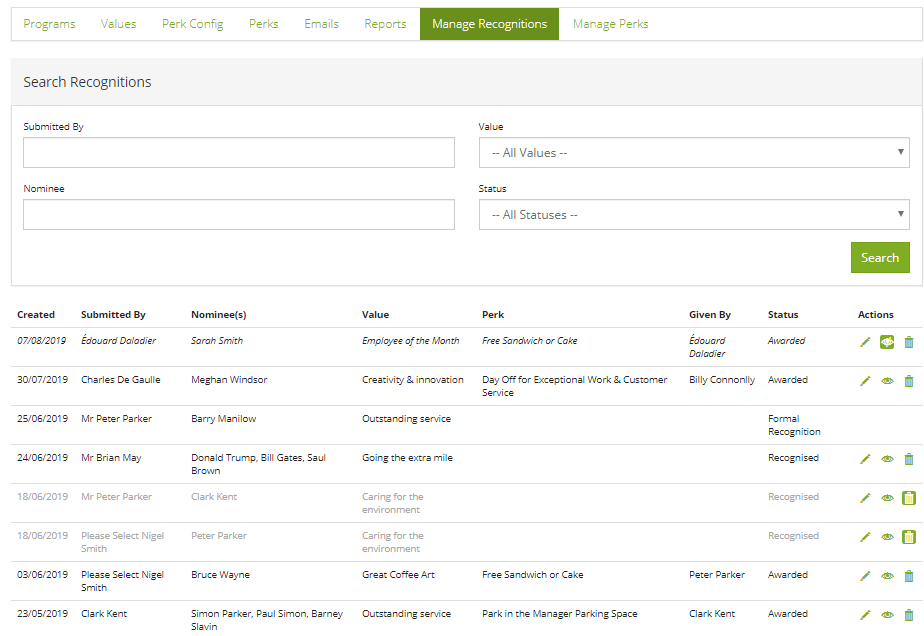
From here, recognition administrators can do the following:
Mark a recognition as private
A private recognition is visible to the nominator and nominee in the activity stream (and recognition chart) but is not visible to anyone else. This is useful if someone asks an administrator to mark a recognition as private e.g. because the recognition was related to a sensitive subject such as redundancy. This flag is not available to everyone within the nomination form because we want to discourage people from creating private recognitions. It's meant to be public and social.
Mark a recognition as deleted
This is a soft delete (i.e. you can undo it). This allows an administrator to remove the recognition from everything for everyone. It no longer counts in recognition chart totals, it's not visible on the home page and it is not in any reports.
Edit recognition
An administrator cannot change who the recognition was awarded to, or who was notified, but by editing the recognition, an administrator can edit text and images (to correct spellings or add a relevant image) and if there is a perk pending approval, this would be where the administrator approves or denies the perk. The administrator cannot change the perk awarded, it would need to be denied (and a reason is needed to confirm why it was denied). A new award can be given if necessary.
Comments
0 comments
Please sign in to leave a comment.