Within your recognition package you will have access to 2 different 'Recognition Programs', these are referred to as: Social Recognition & Formal Recognition.
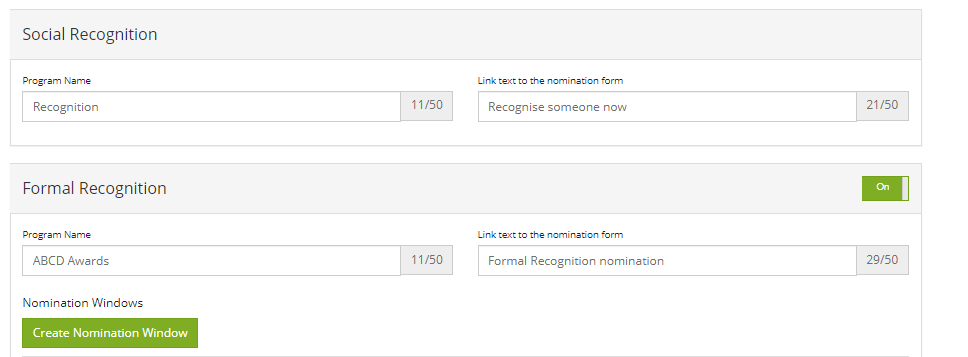
Within the admin section for Recognition the first tab you will need to complete is the 'Programs' tab. On this page you will find two customisable sections to complete to begin the set-up of your Recognition program. The program name is what will appear along the tab of your employee portal (please ensure this matches with your internal marketing efforts). The 2nd box for the link text is used on the main recognition text as a button to click to go to the social recognition nomination form
'Social Recognition' is the standard module and will be available 24/7 throughout the year for employees to access and make recognitions or simply read over ones made by other staff members and even giving recognitions a like. It is a social feed of sorts to get people active and using the software. They would be making recognitions for co-workers matching against your company values (that you set) and the perks awarded would be day to day awards such as:
Coffee on Us
Chocolate Box
A Days Holiday
Work from Home day
Park in the Managers Spot
Goody Bag (you can be imaginative as you please – as long as the redemption process is in place).
'Formal Recognition' works differently. The process to make a nomination is the same but these are available during a specific nomination period that you set out within the admin section. This would suit annual awards or quarterly award events. You make them fit with what internal awards processes you already have in place. The awards for these tend to be larger and financial and are usually redeemed wholly offline (unless you have a float set-up with our gift card provider - which can be arranged).
Next step is to set up your Recognition Values - click here to see how to do that
Comments
0 comments
Please sign in to leave a comment.